GoPottie
Account & Data Deletion
You have the right to delete your GoPottie account and all associated personal data at any time. Deletion is permanent and cannot be undone. This page explains exactly what gets removed and how to do it directly inside the app.
What gets deleted
- Your account credentials and profile information
- All pot names and notes you have added, including any photos attached to your pots
- Your catch log and any notes attached to your pots
- Device tokens used for push notifications
- Any subscription or billing details stored on our servers
Data is removed from our servers within 30 days of your deletion request. Anonymised, non-identifiable aggregate data (e.g. region-level catch statistics) may be retained for product improvement.
How to delete your account
Open the app and go to Profile
Tap the Profile icon in the bottom-right corner of the navigation bar.
Scroll down to find Delete account
Below the Sign out button you will see a red Delete account option.
Confirm the deletion
A confirmation prompt will appear. Tap Delete to permanently remove your account and all associated data.
Done — your data is queued for removal
You will be signed out immediately. All personal data will be permanently deleted from our servers within 30 days.
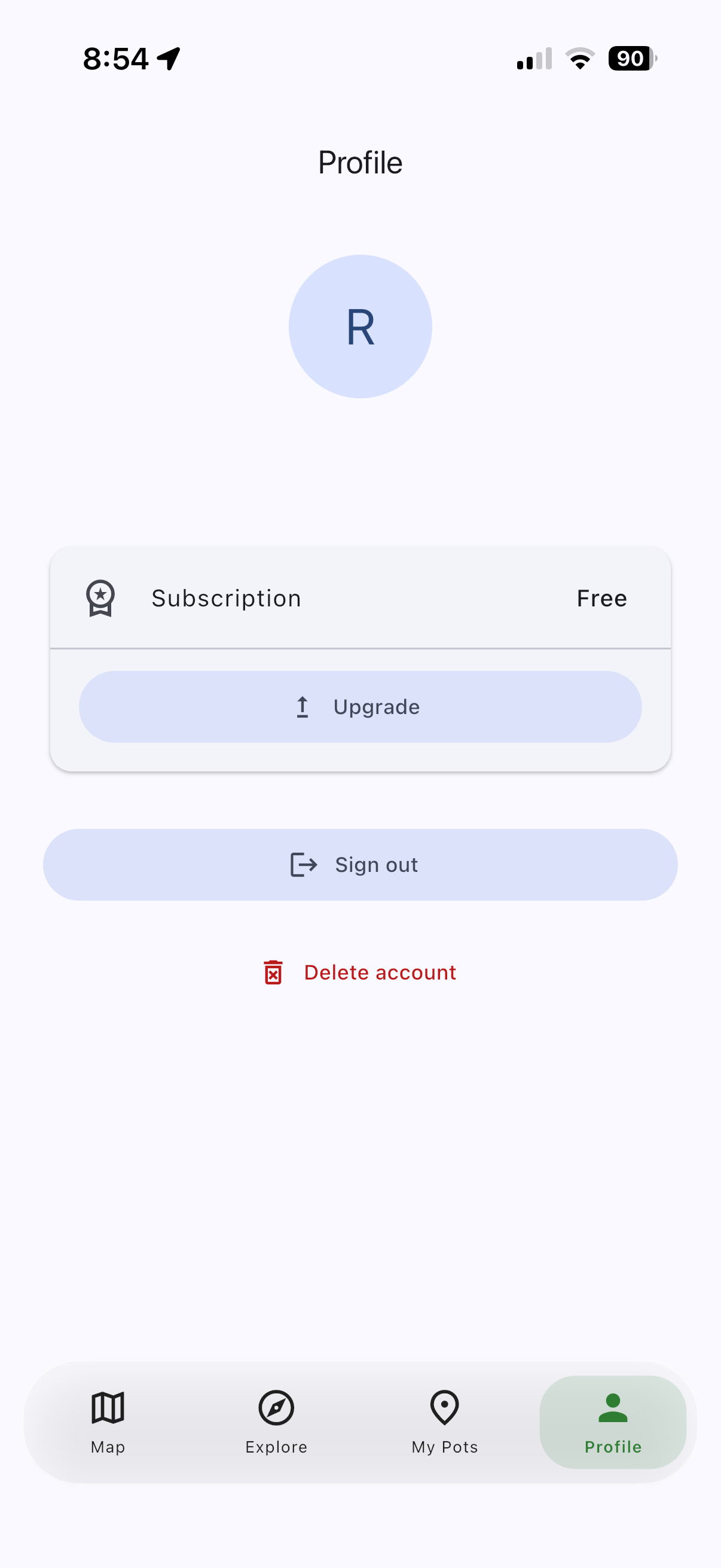
Profile screen in GoPottie
Need help?
If you are unable to access the app or need us to delete your data on your behalf, please contact us at rory@borrowd.co.uk and we will process your request within 30 days.
© 2026 borrowd — All rights reserved